
Digital Roof Takeoff
Calibrate a roof plan and measure the geometry directly in QuoteCore+.
QuoteCore+ features
Take measurements, apply your own pricing rules, build the customer quote, send and track it, then carry accepted work into orders and invoices. Use the quick interactive tour or scroll through the workflow in detail below.
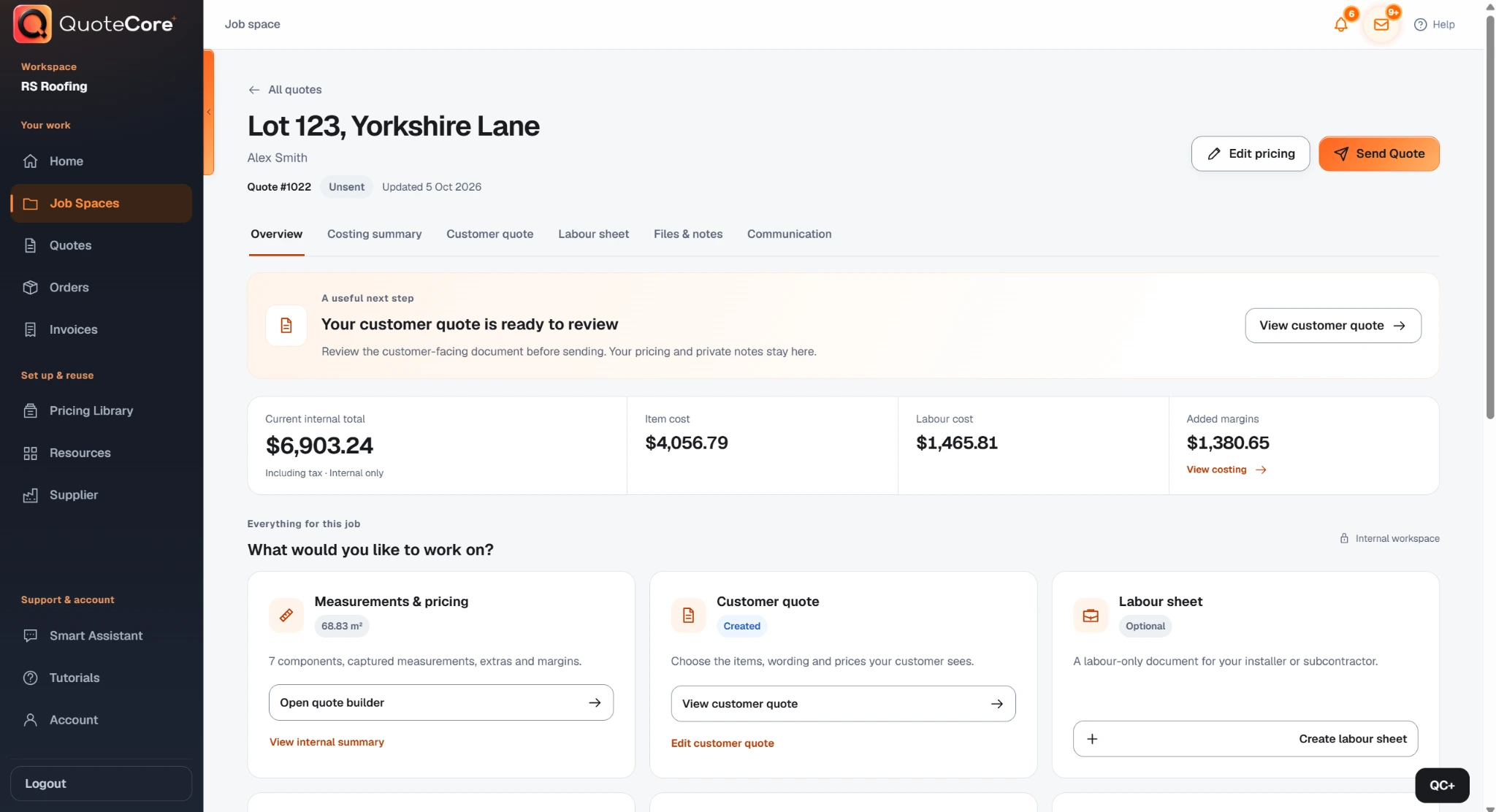
Quick product tour
QuoteCore+ features
Explore each feature tab and use the slider arrows to see the main features and how they work.
Measure, price and quote manually, or tell the Smart Assistant to do it for you by voice or text.
Explore a sample job. No signup.

Bring your materials, labour rates and pricing rules. Smart Components™ calculate the rest when you enter quantities.
Explore a sample job. No signup.
Loading the pricing demonstration…
Enter the areas, lengths and quantities you already have. Your components turn those measurements into materials, labour and pricing.
Explore a sample job. No signup.
Draw on your plan and QuoteCore+ calculates the measurements and price using your saved component rates. Roofs, walls, floors and more.
Explore a sample job. No signup.
Turn your saved job details into quotes, purchase orders and invoices, without entering the same information again.
Explore a sample job. No signup.
Smart Assistant V1 Beta: capabilities are developing, and some steps may need manual completion.
Prefer to scroll?
One connected workflow
Use Digital Takeoff, Roof Scan Assist or measurements you already have.
Apply Smart Components with your materials, labour, waste and pricing rules.
Build and edit the customer-facing quote from the priced job.
Send from QuoteCore+ and keep quote activity and follow-up connected.
Use the accepted job and material quantities as the starting point for ordering.
Create the invoice from the same job instead of rebuilding the information again.
01 · Start with the measurements
QuoteCore+ does not force every New Zealand job through the same measurement method. Start with a plan when that is useful, or enter the areas, lengths and quantities you already have from site, another report or another takeoff.
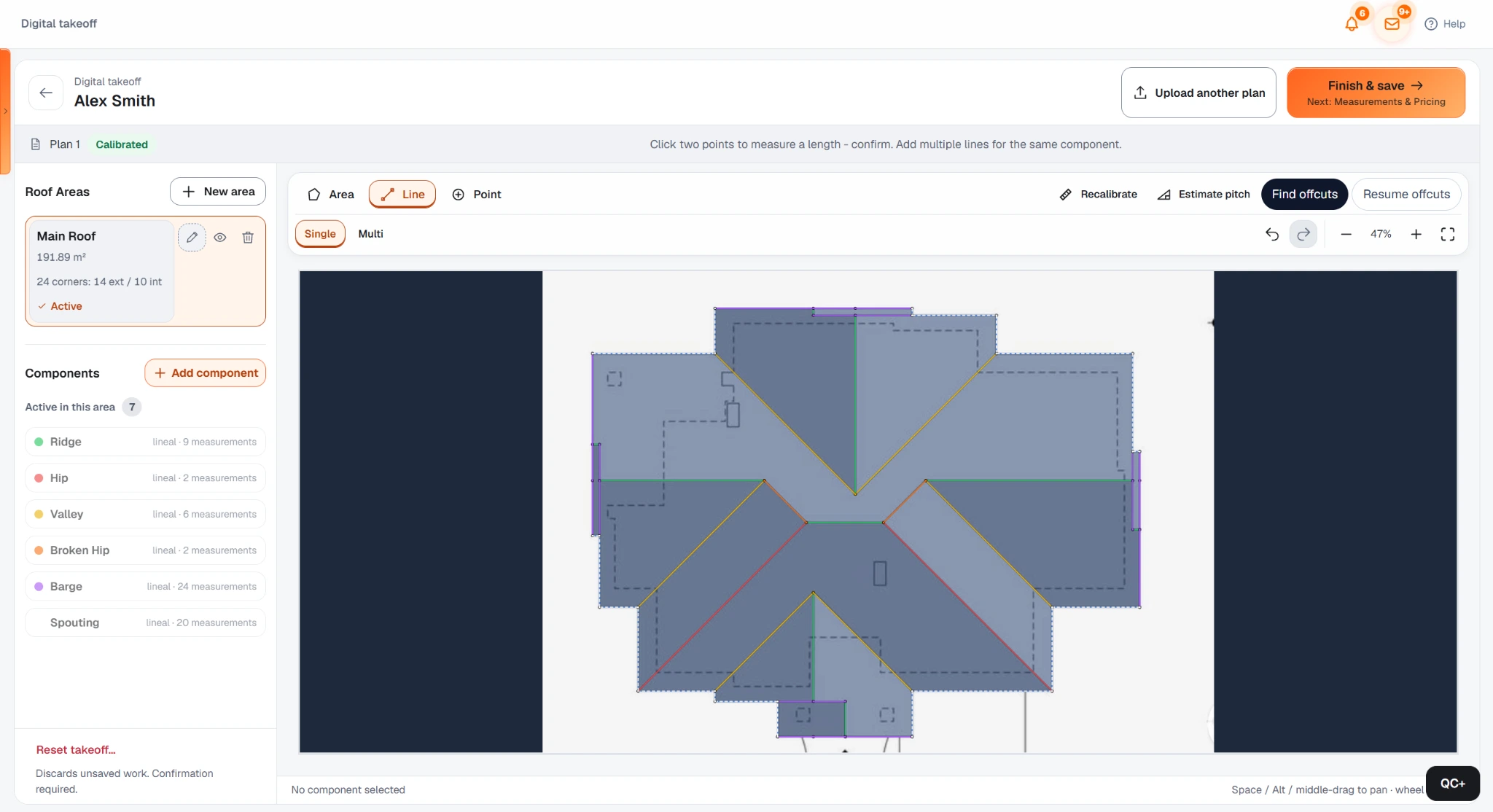
Calibrate a roof plan and measure the geometry directly in QuoteCore+.
Let AI complete the roof geometry first on a clear, correctly calibrated plan, then edit only when needed.
Enter areas, lengths and quantities directly when measurement work has already been completed.
02 · Apply your own pricing
Smart Components are the repeatable logic between a measurement and a priced job. Instead of rebuilding a formula for every estimate, save the way your business prices repeated work and apply it to the relevant quantity.
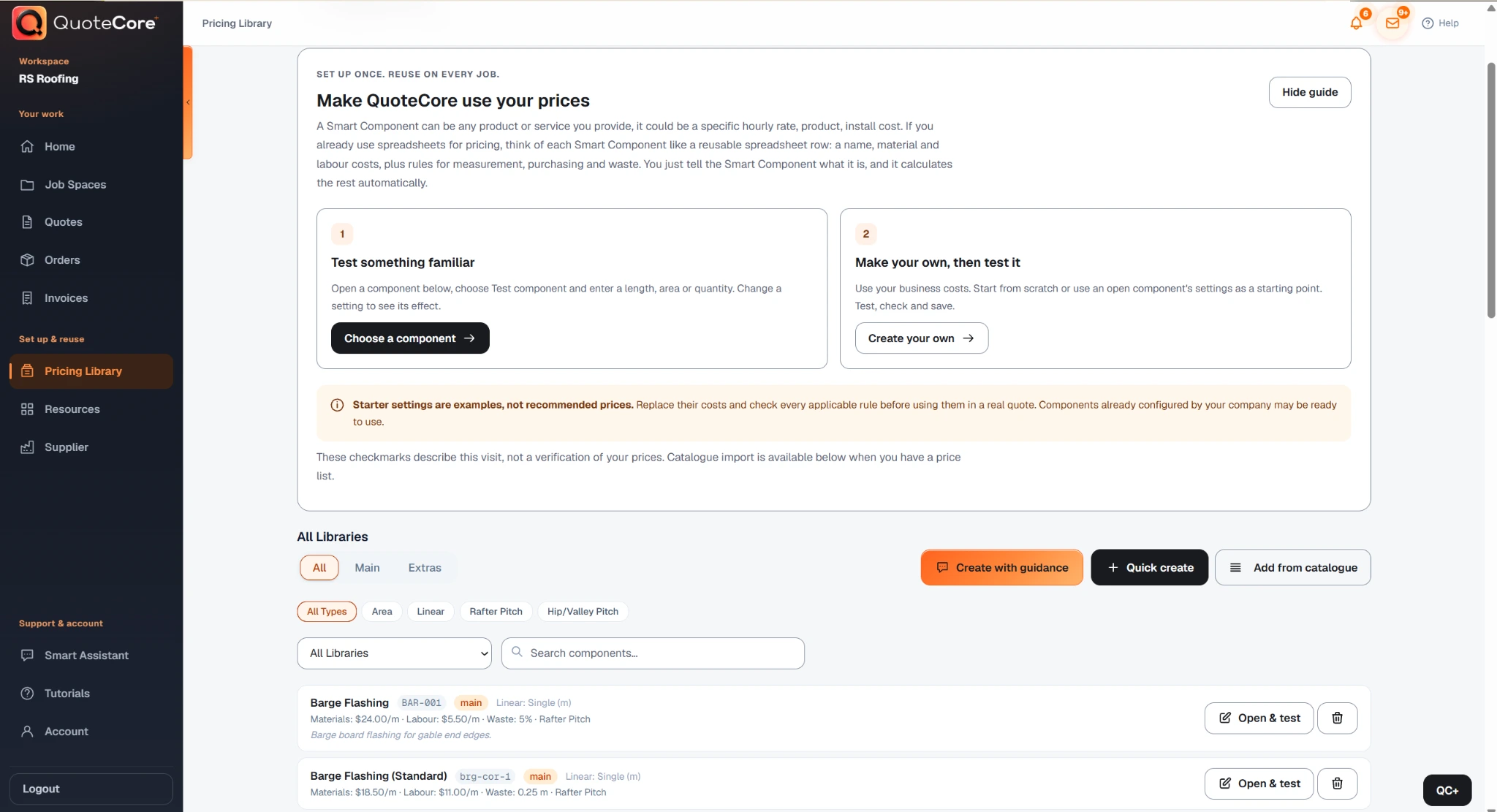
03 · Build the customer quote
The customer quote is the next presentation layer of the job, not a separate document you need to rebuild from scratch. Review what the customer sees, edit the scope and presentation, then send it when it is ready.
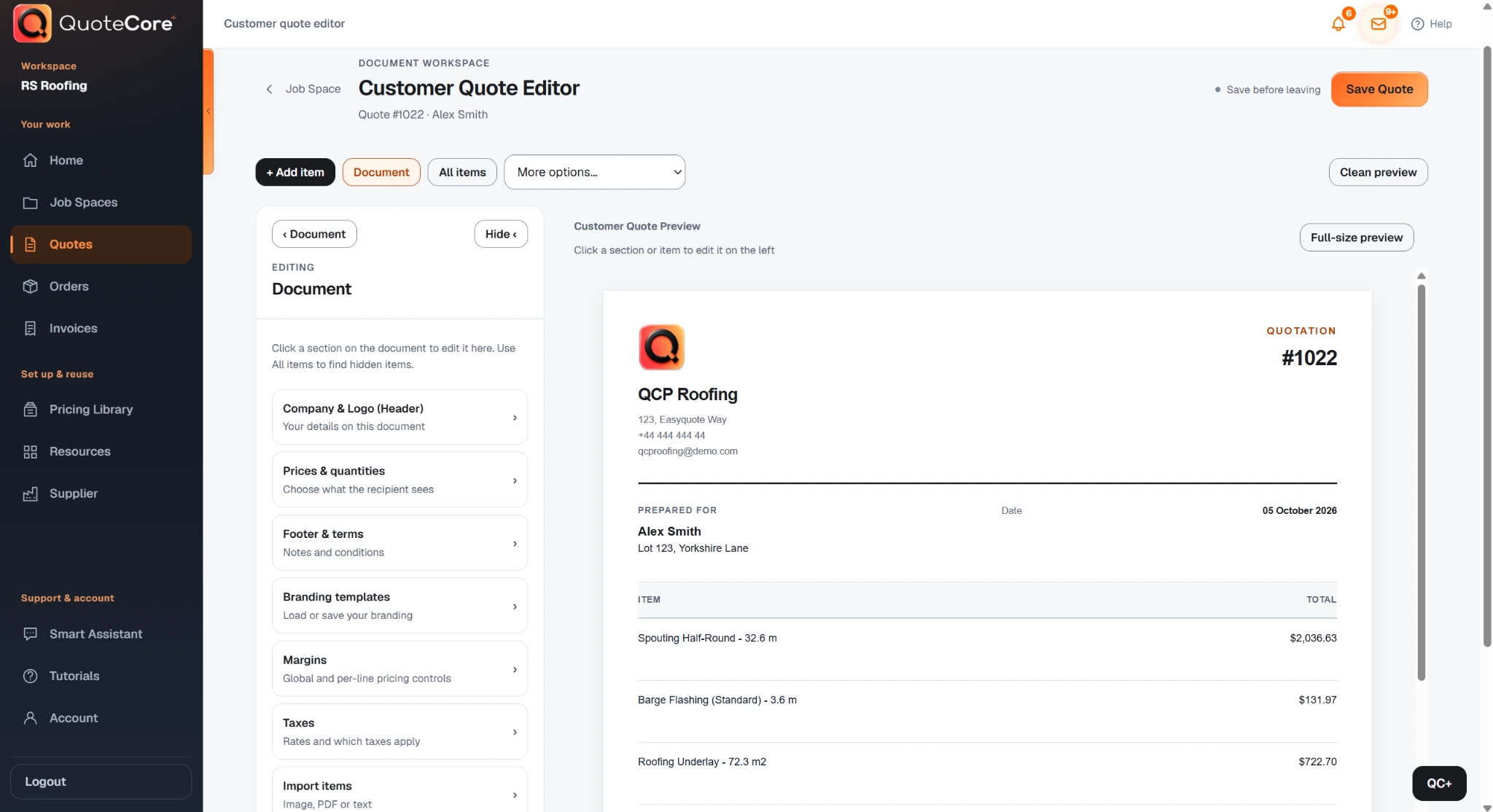
04 · Keep accepted work moving
Sending, follow-up, material ordering and invoicing sit downstream of the priced job. QuoteCore+ is designed to reduce the amount of information you have to re-enter as the work moves forward.
Supporting features
Use voice or text for supported account tasks, finding information and working with parts of your pricing or quote workflow while keeping important changes reviewable.
Use supplier catalogues and component resources as inputs when maintaining the products and pricing available to your workflow.
If configuring the system is the part you do not want to spend time on, QuoteCore+ can help translate the agreed pricing and workflow into your account.
Feature index
Measure plans directly in the app.
Open featureAutomate roof geometry on suitable plans.
Open featureUse voice or text for supported estimating tasks.
Open featureSuggest cutting plans for long-run metal roofs.
Open featureReuse your own materials, labour and pricing logic.
Open featureSend quotes and keep activity or follow-up connected.
Open featureCarry accepted job quantities into supplier orders.
Open featureCreate invoices from the same connected job workflow.
Open featureFind and maintain useful supplier and catalogue inputs.
Open featureAlready measured the job? Price those quantities without starting from a plan.
Open toolFAQ
Practical answers about how QuoteCore+ fits into real estimating, takeoff and quoting workflows.
QuoteCore+ connects job measurements, Digital Takeoff, Roof Scan Assist, reusable Smart Components, estimating and pricing, customer quotes, sending and tracking, material orders, invoices and supporting account tools in one web-based workflow.
Yes. Digital Takeoff lets you calibrate a plan and measure areas and lengths directly in the app. Roofing can also use Roof Scan Assist to automate the roof geometry on suitable plans.
Yes. On a clear, correctly calibrated plan, especially a simple to moderately complex roof, Roof Scan Assist can complete the roof geometry quickly and accurately. Lower-quality drawings or more complex geometry can require manual edits in the same takeoff workspace.
Yes. You can enter areas, lengths and quantities from a site measure, another takeoff, an aerial report or a spreadsheet instead of measuring a plan inside QuoteCore+.
Yes. Smart Components store the materials, labour, waste, quantity rules and pricing logic you choose. The measured quantity then drives the calculation instead of using a generic price book.
QuoteCore+ can keep the customer quote connected to its job, help you track quote activity and follow-up, and carry accepted work into downstream steps such as material orders and invoices.
No. QuoteCore+ has deep roofing workflows, including Roof Scan Assist and long-run offcut tools, but the core measure-to-price workflow can also suit construction and measured trades such as cladding, flooring and other work that begins with quantities.
Choose your next step
Open a prepared QuoteCore+ roofing workspace and explore the current workflow at your own pace.
Explore the demoTell us how you currently work and we will screen-share a workflow that is relevant to your trade and questions.
Book a tailored demoChoose the workload and tools your business needs and see the current monthly price before you continue.
Build your subscription configurationRelated
QuoteCore+
Explore the prepared app demo, build a pricing configuration or start with a free tool. QuoteCore+ keeps the measure-to-price workflow connected when you are ready to go further.