
Feature
Turn accepted contractor quotes into professional invoices.
Create a branded, professional invoice from an accepted quote, import a quote from another tool, or start from scratch. Line items, pricing, and payment instructions flow automatically. No formatting, no spreadsheets.
New Zealand workflow
Create invoices that fit a New Zealand trade workflow
Carry the agreed scope and value forward from a quote or create an invoice independently, with clear totals and GST treatment for the customer.
Invoice totals
Present line items, subtotals and invoice totals clearly.
Clear GST treatment
Show the tax treatment used on the invoice so totals are easy for both parties to understand.
Payment instructions
Provide the reference and payment details the customer needs without implying that QuoteCore+ processes the payment.
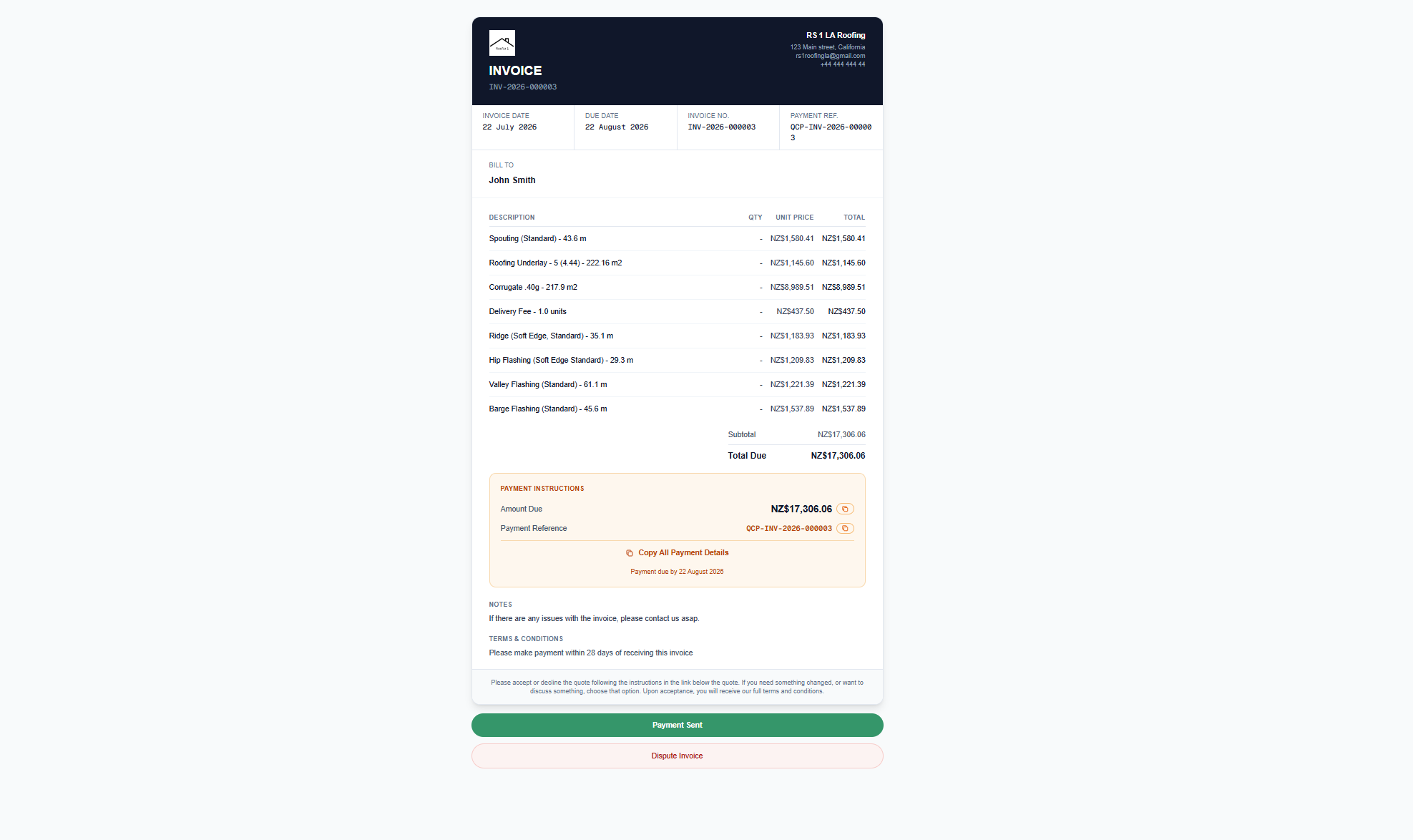
Three ways to start
From an accepted quote, import a quote from elsewhere, or create a blank invoice from scratch. The tool works standalone.
Payment instructions panel
Amount due, payment reference, and due date in a highlighted panel. One-click copy for customers.
Customer actions
Customers can mark payment as sent or dispute the invoice. QuoteCore+ does not process payments - it tracks status so both parties stay informed.
What is invoicing in QuoteCore+?
Invoicing is a standalone tool. You can generate an invoice from an accepted quote in QuoteCore+, import a quote from another tool, or create a blank invoice from scratch. However you start, the result is a branded, professional invoice document with line items, totals, and payment instructions.
Every invoice includes a payment instructions panel with the amount due, payment reference, and due date. Customers can copy payment details with a single click, mark payment as sent, or dispute the invoice. You see the status of every invoice without chasing emails.
How it works
Start from a quote or from scratch
Generate an invoice from an accepted quote in QuoteCore+, import a quote from another tool, or create a blank invoice from scratch. Three ways in, same professional result.
Line items flow automatically
When starting from a quote, line items, descriptions, quantities, and pricing flow directly from the quote's Smart Components™. No re-entry, no formatting.
Payment instructions included
Every invoice includes a payment instructions panel with amount due, payment reference, and due date. Customers copy details with a single click.
Send and track
Send the invoice to your customer. They can mark payment as sent or dispute the invoice. You see the status of every invoice without chasing emails.
Worked example: NZ roofing invoice with GST
Invoicing a residential re-roof in Auckland for $16,500 (GST inclusive):
- 1. Create from accepted quote: The accepted quote ($16,500 incl GST) converts to an invoice. Line items, quantities, and pricing carry over. You can edit before sending.
- 2. GST breakdown: Subtotal: $14,347.83. GST (15%): $2,152.17. Total: $16,500.00.
- 3. Payment instructions: Bank transfer to 12-3456-7890123-01. Reference: INV-2026-042. Due: 14 days from issue.
- 4. Customer actions: Customer receives the invoice, marks payment as sent once they transfer the funds, and the invoice status updates for both parties.
- 5. Business details: Your NZBN, GST number, and business address appear on every invoice.
GST calculation and invoicing requirements follow Inland Revenue rules. Verify current GST rate and requirements at ird.govt.nz.
Who it's for
Contractors who want to send professional invoices without manually formatting them. Whether you quote in QuoteCore+ or elsewhere, the invoicing tool gives you a clean, branded document with payment tracking.
What problem it solves
Manual invoice formatting
Creating invoices from quote data means re-entering line items, quantities, and prices. The invoice builder does this automatically.
Missing payment details
Invoices without clear payment instructions lead to delayed payments. Every QuoteCore+ invoice includes a payment panel with all the details.
No invoice tracking
When invoices are sent as PDFs, you don't know if the customer has seen them or acted on them. QuoteCore+ tracks status automatically.
Frequently asked questions
Do I need a quote to create an invoice?
No. You can generate an invoice from an accepted quote in QuoteCore+, import a quote from another tool, or create a blank invoice from scratch. The invoicing tool works standalone.
Do invoices include payment instructions?
Yes. Every invoice includes a payment instructions panel with the amount due, payment reference, and due date. Customers can copy payment details with a single click.
Can customers confirm payment or dispute an invoice online?
Yes. Invoices include action buttons for customers to mark payment as sent or dispute the invoice. QuoteCore+ does not process payments - customers pay using the included payment instructions (such as bank details) and mark payment as sent. This gives both parties a clear record of invoice status.
Do invoices include GST and my NZ business details?
Yes. Invoices show GST inclusive/exclusive amounts, your GST number, and your NZBN. You can set up your business details once and every invoice includes them automatically. GST is calculated at the current NZ rate - verify at ird.govt.nz.
Related
Digital roof takeoff
Measure the job. The takeoff flows into the quote, and the quote flows into the invoice.
Smart Components™
Components carry pricing through from takeoff to quote to invoice.
Material ordering
Order materials from suppliers and invoice customers from the same data.
Free invoice generator
Create a professional invoice for free, no signup required.